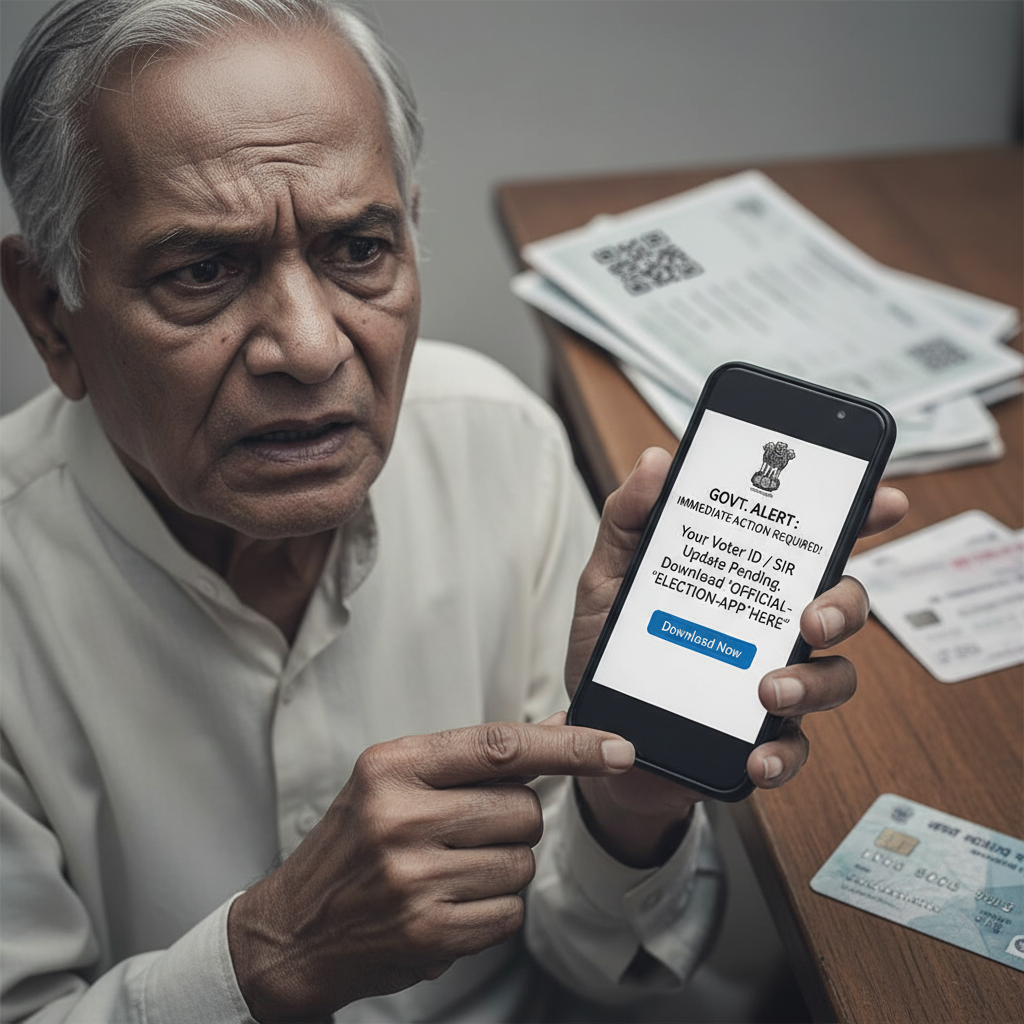
WhatsApp SIR verification scam: Downloaded app, money stolen, what to do?
Fraudsters are using government scheme and event impersonation tactics on WhatsApp/SMS to trick individuals into downloading malicious applications (APKs). These apps, often disguised as official verification tools, steal sensitive financial information, leading to significant monetary losses, as tragically exemplified by a recent case in Mangaluru. This is a high-risk scam targeting unsuspecting citizens.
How This Scam Works
This sophisticated scam leverages social engineering to exploit trust in government entities and official processes. It typically begins with an unsolicited message sent via WhatsApp or SMS, often appearing to come from an official-looking number or sender ID. The message will inform the recipient of an urgent matter related to a government scheme, an election, a voter verification process, or a public event. For instance, it might claim there's a discrepancy in your voter ID, an issue with your Aadhaar linkage to a welfare scheme, or a mandatory update required for an upcoming government service. The core of the scam lies in the immediate call to action: to "resolve" this purported issue, the victim is instructed to download a specific mobile application. This application is presented as an official tool – perhaps for "SIR verification," "voter data update," "scheme benefits claim," or "event registration." The fraudsters create highly convincing narratives, often including links that look legitimate, or providing detailed instructions on how to download the app from a third-party source rather than official app stores like Google Play Store or Apple App Store. Once the victim downloads and installs the malicious APK, they are prompted to grant numerous permissions – often intrusive ones like access to SMS, contacts, camera, and even accessibility services. Unbeknownst to the victim, these permissions allow the fraudsters to remotely access their device. This access is then used to: 1. **Steal OTPs:** The malicious app can intercept One-Time Passwords (OTPs) sent by banks or payment services, which are crucial for authorizing financial transactions. 2. **Access Banking Apps:** With accessibility permissions, the scamsters can record screen activity, log keystrokes, and even remotely operate banking applications installed on the victim's phone. 3. **Harvest Personal Data:** Other sensitive information like UPI PINs, bank account details, Aadhaar numbers, and PAN details can be extracted from the device. 4. **Remote Control:** In some advanced variants, the app acts as a remote access trojan (RAT), giving the scammer full control over the phone, allowing them to initiate transactions directly. The victim might be asked to enter their banking credentials "to verify their identity" within the malicious app or simply be distracted while funds are drained from their accounts in the background. The sense of urgency and the official guise make victims drop their guard, leading to devastating financial losses, as seen in the Mangaluru case where a 71-year-old lost ₹6.82 lakh after downloading an app for "SIR verification."
Red Flags
- Unsolicited Messages with Urgent Calls to Action:** Any message from an unknown number or sender, especially on WhatsApp/SMS, demanding immediate action for government-related issues.
- Request to Download Apps from Unofficial Sources:** Being asked to download an APK directly from a link, a website, or any source other than the Google Play Store or Apple App Store. Government apps are *always* on official app stores.
- Demanding Excessive Permissions:** The "official" app asks for unusual permissions, such as access to SMS, contacts, camera, or accessibility services, that seem unrelated to its stated purpose.
- Pressure Tactics and Threats:** Messages that threaten suspension of services, penalties, or loss of benefits if you don't act immediately.
- Grammatical Errors and Poor Formatting:** While improving, many scam messages still contain tell-tale signs like awkward phrasing, spelling mistakes, or inconsistent formatting.
- Asking for Confidential Details:** Any message or app asking for your full bank account number, UPI PIN, ATM PIN, or full Aadhaar number. Official entities rarely ask for such sensitive information through unsolicited messages or unofficial apps.
- Generic Salutations:** Messages addressing you impersonally, like "Dear Citizen" or "User," instead of your name.
How to Stay Safe
- Verify Independently:** Always verify any government-related communication through official channels. Visit the official website directly (by typing the URL into your browser, not clicking links), or call the official helpline number (found on the official website).
- Never Download Unverified APKs:** Absolutely avoid downloading applications from links received via WhatsApp, SMS, or unofficial websites. Always use Google Play Store or Apple App Store for legitimate apps.
- Check App Permissions Carefully:** Before installing any app, review the permissions it requests. If an app for voter verification asks for access to your SMS or banking apps, it’s a major red flag.
- Enable Two-Factor Authentication (2FA):** Activate 2FA for all your online banking, UPI apps, and email accounts. This adds an extra layer of security, even if your password is compromised.
- Be Skeptical of "Too Good to Be True" Offers:** If a message promises huge government benefits or schemes with minimal effort, it’s likely a scam.
- Educate Yourself and Others:** Share this information with elderly family members and friends who may be more susceptible to such social engineering tactics.
- Install Reputable Antivirus/Anti-Malware:** Keep your phone protected with a good security application that can detect and block malicious software.
If You Are Targeted
- Do NOT Click Links or Download Apps:** If you receive such a message, do not click on any links or download any attachments or applications.
- Block and Report:** Block the sender's number on WhatsApp and report the message as spam.
- Inform Your Bank Immediately:** If you have already clicked a link, downloaded an app, and suspect your bank account details are compromised, contact your bank's fraud department immediately to freeze your accounts and block transactions.
- Change All Passwords:** Change passwords for all your banking apps, UPI apps, email, and any other critical online accounts.
- File a Police Complaint:** Report the incident to the cybercrime cell immediately. You can do this online at www.cybercrime.gov.in or by calling helpline number 1930. Provide all details of the scam message and any transactions.
- Perform a Factory Reset:** As a last resort, if you have installed a malicious APK and cannot remove it, perform a factory reset on your phone (after backing up important data) to ensure all malware is eradicated.
ScamGuard24 Insight
This scam's effectiveness stems from exploiting the trust associated with government initiatives and the urgency it instills. The use of malicious APKs is a severe threat because it bypasses conventional security measures, granting fraudsters deep access to a victim's device and financial ecosystem, often without the user's immediate knowledge until funds are stolen. Users must understand that no legitimate government process will ever require downloading an unofficial app or demand personal financial details over unsolicited messages.
Suspect a scam right now?
Open ScamGuard24 ScannerRecommended protection tools
AffiliateWe may earn a small commission if you sign up — it never changes our editorial picks.
India's most trusted antivirus. Blocks malicious APKs, UPI phishing and fake banking apps.
Get Quick HealAll-in-one mobile security + VPN. Stops phishing links shared on WhatsApp and SMS.
Try Norton 360Stop reusing passwords. Auto-fills only on the real bank site, never on phishing pages.
Get NordPassRelated alerts
 HIGH RISK
Instagram/WhatsApp task scam, invest money daily return, is it real?
 HIGH RISK
Fake Aadhaar Update Centre near me — is it real? How to check?
 HIGH RISK
Comments
Be the first to comment.