PhonePe/GPay ₹1 refund request scam — what to do if I tapped Pay?
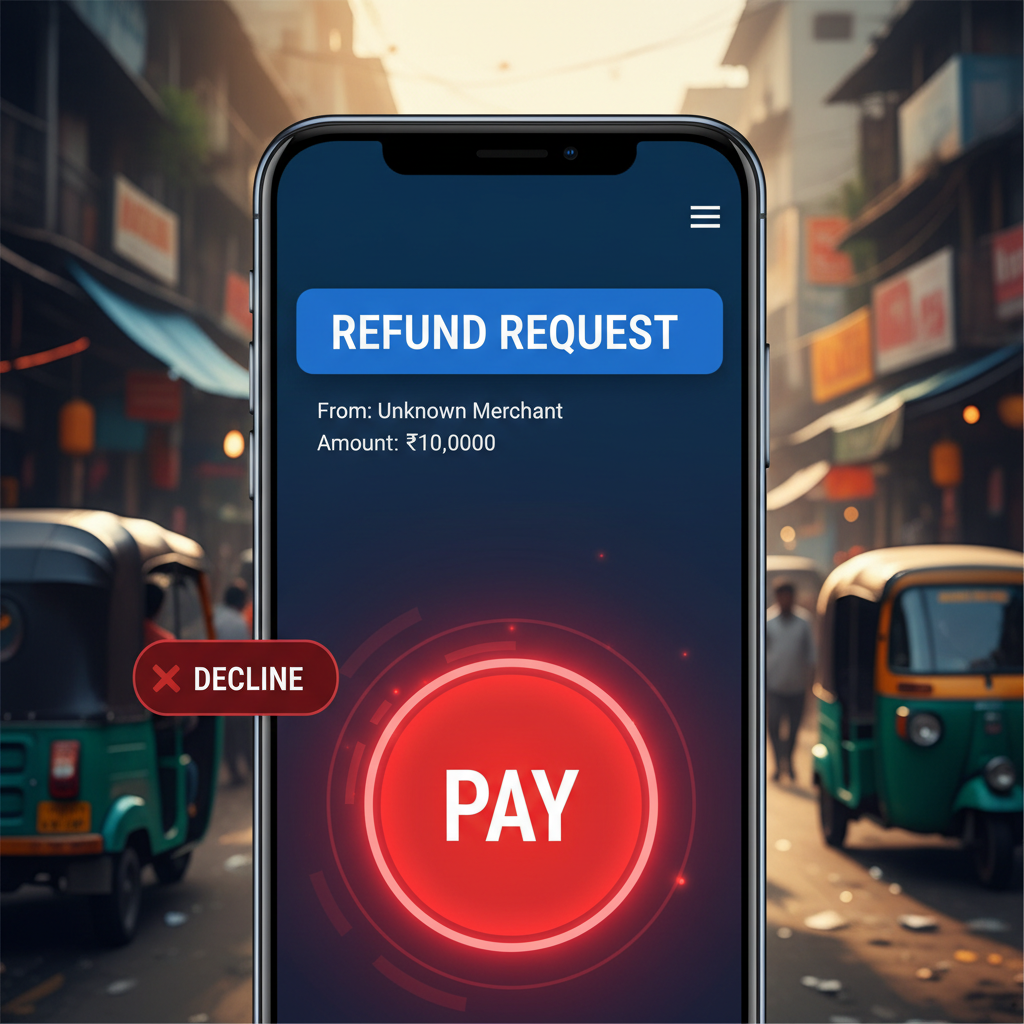
This alert exposes the deceptive "UPI Collect Request Trick" a high-risk scam targeting popular platforms like PhonePe, GPay, and Paytm. Scammers send fake payment requests disguised as refunds or cashbacks, tricking users into unknowingly authorizing a debit from their account. The crucial detail? Tapping 'Pay' directly allows the transaction without an additional OTP.
How This Scam Works
The "UPI Collect Request Trick" is a particularly insidious form of social engineering that preys on a user's expectation of receiving money. It starts with a scammer initiating a UPI 'collect request' (also known as a 'payment request') to your UPI ID on platforms like PhonePe, GPay, or Paytm. The cunning part lies in the accompanying message. Instead of clearly asking for money, the message will be cleverly worded to sound like you are about to *receive* money. Common phrases include "Your refund has been processed, tap to confirm," "Cashback alert! Approve to receive ₹X," or even "Payment pending for your order, accept to complete." Victims often fall prey when they are expecting a refund, perhaps from an online purchase, or are enticed by the promise of unexpected cashback. Upon seeing such a message pop up on their app, their immediate reaction might be to tap the most prominent button, which is usually 'Pay' or 'Approve' – often accompanied by a green or positive-looking icon. What many users fail to realize is that confirming a 'collect request' with 'Pay' is an *authorization* to send money, not to receive it. Crucially, because you are *authorizing* the transaction by tapping 'Pay' within the app after reviewing the request, an additional OTP is often not required to complete the debit from your linked bank account. This bypasses a critical layer of security many users rely on for personal banking. The amount requested can vary from small, seemingly insignificant sums like ₹1 to larger amounts, depending on the scammer's objective and audacity. Once you tap 'Pay,' your bank account is debited, and the money is sent directly to the scammer. Recovery of these funds is notoriously difficult.
Red Flags
- Any unexpected 'refund,' 'cashback,' or 'prize money' notification that requires you to "tap to receive" or "approve" on your UPI app.
- The sender's name or UPI ID seems generic, unusual, or doesn't match a legitimate company or individual you're expecting money from.
- The message accompanying the request is poorly worded, contains grammatical errors, or uses urgent language to pressure you into immediate action.
- A 'payment request' or 'collect request' is sent to you when you were expecting to *receive* money, not send it. Remember, to *receive* money via UPI, someone sends it to your UPI ID, and you don't need to 'approve' anything beyond sharing your UPI ID.
- Calls or messages from unknown numbers asking you to "verify" or "activate" a refund by accepting a UPI request. Always be suspicious of unsolicited contact.
How to Stay Safe
- Always read carefully:** Before tapping 'Pay' or 'Approve' on any UPI request, meticulously read the full message and understand *who* is sending the request and *what* it is asking you to do.
- Verify the sender:** If you are expecting a refund, cross-verify the request with the actual company or merchant through their official channels (website, customer care number) *before* interacting with the UPI request.
- Understand UPI requests:** Remember this golden rule: To *send* money, you initiate a 'Pay' transaction. To *receive* money, someone sends it to you; you do not need to "approve" or "accept" a request to get money. A 'collect request' is always for *sending* money.
- Treat unsolicited requests with suspicion:** If you receive an unexpected UPI request for any amount, especially with a message about refunds or cashback, decline it immediately. Do not interact with the sender.
- Use UPI PIN wisely:** Never share your UPI PIN with anyone. Your PIN is for *sending* money, not receiving it. If someone asks for your PIN to "send" you money, it's a scam.
- Regularly check transaction history:** Keep an eye on your UPI transaction history and bank statements for any unauthorized debits.
If You Are Targeted
- Do not panic:** The first step is to remain calm. Panicking can lead to further mistakes.
- Contact your bank immediately:** Report the unauthorized transaction to your bank's fraud department. Provide them with all transaction details, screenshots, and the time of the incident. Ask them to block the payment if it is still pending or initiate a chargeback if possible.
- Report to the UPI app provider:** Inform PhonePe, GPay, or Paytm support about the fraudulent transaction and the scammer's UPI ID. They may be able to block the scammer's account.
- File a complaint on the National Cybercrime Reporting Portal:** Visit cybercrime.gov.in (or call toll-free helpline 1930) to file an official complaint. This is crucial for potential investigation and recovery efforts by law enforcement. Provide all evidence, including screenshots of the request, transaction details, and any communication with the scammer.
- Change your UPI PIN:** As a precautionary measure, change your UPI PIN for all your linked bank accounts. Also, review your device for any suspicious apps or activities.
ScamGuard24 Insight
The UPI Collect Request Trick is a prime example of social engineering combined with a misunderstanding of app functionality. Scammers exploit the trust users place in official-looking notifications and their desire for monetary gain. Users must internalize that receiving money via UPI *never* requires them to "approve" or "pay" a request.
Suspect a scam right now?
Open ScamGuard24 ScannerRecommended protection tools
AffiliateWe may earn a small commission if you sign up — it never changes our editorial picks.
India's most trusted antivirus. Blocks malicious APKs, UPI phishing and fake banking apps.
Get Quick HealAll-in-one mobile security + VPN. Stops phishing links shared on WhatsApp and SMS.
Try Norton 360Stop reusing passwords. Auto-fills only on the real bank site, never on phishing pages.
Get NordPassRelated alerts
 HIGH RISK
Telegram crypto investment 30% monthly returns India scam – is it real?
 HIGH RISK
Airline Customer Care fake number call for refund – what to do UPI?
 HIGH RISK
Comments
Be the first to comment.