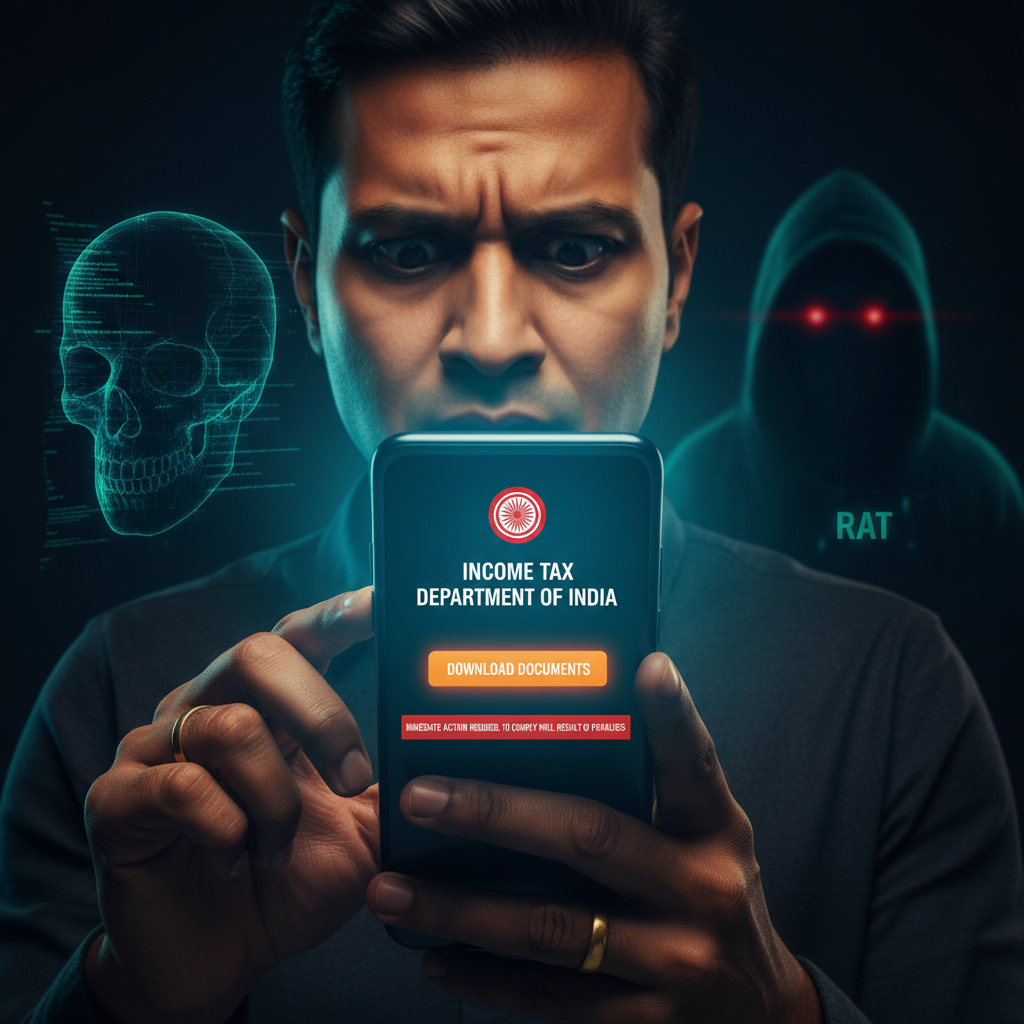
Indian Income Tax SMS asking to download documents? Is it a scam? What to do immediately?
Beware of a sophisticated new scam targeting Indians that uses fake Income Tax Department notices via SMS or email. These messages trick you into downloading "important documents" from a malicious link, silently installing dangerous Remote Access Trojans (RATs) like Gh0st RAT and Quasar/AsyncRAT onto your device, giving scammers full control. This can lead to severe financial theft and data breaches.
How This Scam Works
This scam preys on the natural fear and urgency associated with tax matters in India. The initial approach is often an unassuming SMS or email, crafted to appear official, originating from what seems to be the "Income Tax Department of India" or a similar government entity. The message typically states that there’s a "tax violation," "pending refund," "discrepancy in your returns," or "urgent action required to avoid penalties." The critical element of the scam is the call to action: a prominent link, disguised as a portal to "Download Documents," "View Your Notice," or "Resolve Your Issue." This link is the gateway to compromise. When you click it, you are invariably directed to a cleverly designed, but fake, government website. These websites are often incredibly convincing, mimicking the look and feel of legitimate Indian government portals, complete with official-looking logos and even fake Aadhaar or PAN verification prompts. However, the moment you click "Download Documents" or "Proceed," you're not actually downloading a PDF or legitimate form. Instead, your device is silently infected with advanced Remote Access Trojans (RATs) such as Gh0st RAT and Quasar/AsyncRAT. These are not simple viruses; they are powerful tools that allow the scammer to gain complete control over your device without your knowledge. Once installed, the RATs can: * **Monitor your every action:** Log keystrokes, record screens, and capture audio. * **Access sensitive data:** Steal bank account details, UPI PINs, credit card numbers, OTPs, Aadhaar details, and other personal identifiable information (PII). * **Control your device remotely:** Open apps, transfer funds, send messages, and even make calls from your device, all while you remain unaware. * **Evade detection:** Many RATs are designed to operate stealthily, avoiding common antivirus software initially. The scammers' ultimate goal is to siphon off your savings, make unauthorized transactions through UPI or net banking, open new accounts in your name, or even use your identity for other illicit activities. The sophistication lies in the silent installation and the complete remote control, making it extremely difficult for victims to detect the intrusion until it's often too late.
Red Flags
- Unsolicited Messages about Tax Issues:** Any unexpected SMS or email from the "Income Tax Department" (or similar government body) demanding immediate action, especially if you haven't recently interacted with them.
- Generic Greetings & Poor English/Hindi:** Legitimate government communications usually address you by name and have impeccable grammar. Scammers often use generic greetings like "Dear Taxpayer" and may have subtle grammatical errors or awkward phrasing.
- Urgent Tone & Threat of Penalties:** Messages that create a sense of panic, threaten immediate penalties, legal action, or account freezing if you don't act within minutes or hours.
- Requests to Download Executable Files (.exe, .apk) or zipped files:** The Income Tax Department will *never* ask you to download software or executable files to view your notice. Legitimate documents are always in PDF format and usually accessed via secure logins on official government websites, not directly via a link in an SMS/email.
- Suspicious Links (URLs):** Hover over links (don't click!) to see the actual URL. Scammers use URLs that might look similar to official ones (e.g., incometax.gov.in) but will have slight variations (e.g., incometax-india.com, taxgov.net, or contain random numbers/characters).
How to Stay Safe
- Verify the Sender:** Always cross-verify the sender's identity. If you receive an SMS/email, do not click links. Instead, manually type the official Income Tax Department website (incometax.gov.in) into your browser and log in to check your status.
- Never Download Unsolicited Files:** Be extremely cautious about downloading any files from unknown sources or links provided in suspicious messages. Government agencies will not send executable files or ask you to install software via email/SMS.
- Use Strong Antivirus/Antimalware Software:** Ensure your computer and smartphone have updated antivirus and antimalware protection. Regularly scan your devices for threats.
- Enable Two-Factor Authentication (2FA):** Set up 2FA for all your banking apps, email accounts, and other critical online services. This adds an extra layer of security, even if your password is compromised.
- Be Skeptical of Urgency:** Scammers rely on panic. Take a moment to think before reacting to messages that demand immediate action.
- Educate Yourself and Others:** Share scam awareness with family and friends, especially senior citizens, who are often targeted.
If You Are Targeted
- Do NOT Click Any Links or Download Files:** If you receive such a message, delete it immediately without interacting with any part of it.
- Disconnect from the Internet (If You Clicked/Downloaded):** If you suspect your device might be infected after clicking a link or downloading a file, immediately disconnect it from the internet (turn off Wi-Fi/mobile data) to prevent further data exfiltration.
- Change Passwords from a Clean Device:** Use a different, trusted device (another phone, a friend's computer) to change passwords for all critical accounts (banking, email, UPI apps, social media). Prioritize financial accounts.
- Contact Your Bank and Block Cards:** Inform your bank about potential compromise and consider blocking your debit/credit cards as a precautionary measure. Monitor your account statements closely for any unauthorized transactions.
- Report the Incident:**
- Cybercrime Portal:** File a complaint immediately on the National Cybercrime Reporting Portal (cybercrime.gov.in) or call the helpline number 1930. Provide all details of the scam.
- Telecom Service Provider:** Report the SMS sender to your mobile operator.
- Email Provider:** Mark the email as "phishing" or "spam."
- Seek Professional Help:** If you suspect a RAT infection, consider seeking professional IT support to clean your device thoroughly and ensure all malware is removed. A factory reset might be necessary for severe infections.
ScamGuard24 Insight
This scam highlights the increasingly sophisticated nature of cyber threats. By combining social engineering with advanced malware, scammers can bypass traditional security measures and gain deep access to victims' digital lives. The use of RATs makes detection extremely difficult, emphasizing the need for proactive vigilance from the user.
Suspect a scam right now?
Open ScamGuard24 ScannerRecommended protection tools
AffiliateWe may earn a small commission if you sign up — it never changes our editorial picks.
India's most trusted antivirus. Blocks malicious APKs, UPI phishing and fake banking apps.
Get Quick HealAll-in-one mobile security + VPN. Stops phishing links shared on WhatsApp and SMS.
Try Norton 360Stop reusing passwords. Auto-fills only on the real bank site, never on phishing pages.
Get NordPassRelated alerts
 HIGH RISK
Instagram/WhatsApp task scam, invest money daily return, is it real?
 HIGH RISK
Fake Aadhaar Update Centre near me — is it real? How to check?
 HIGH RISK
Comments
Be the first to comment.