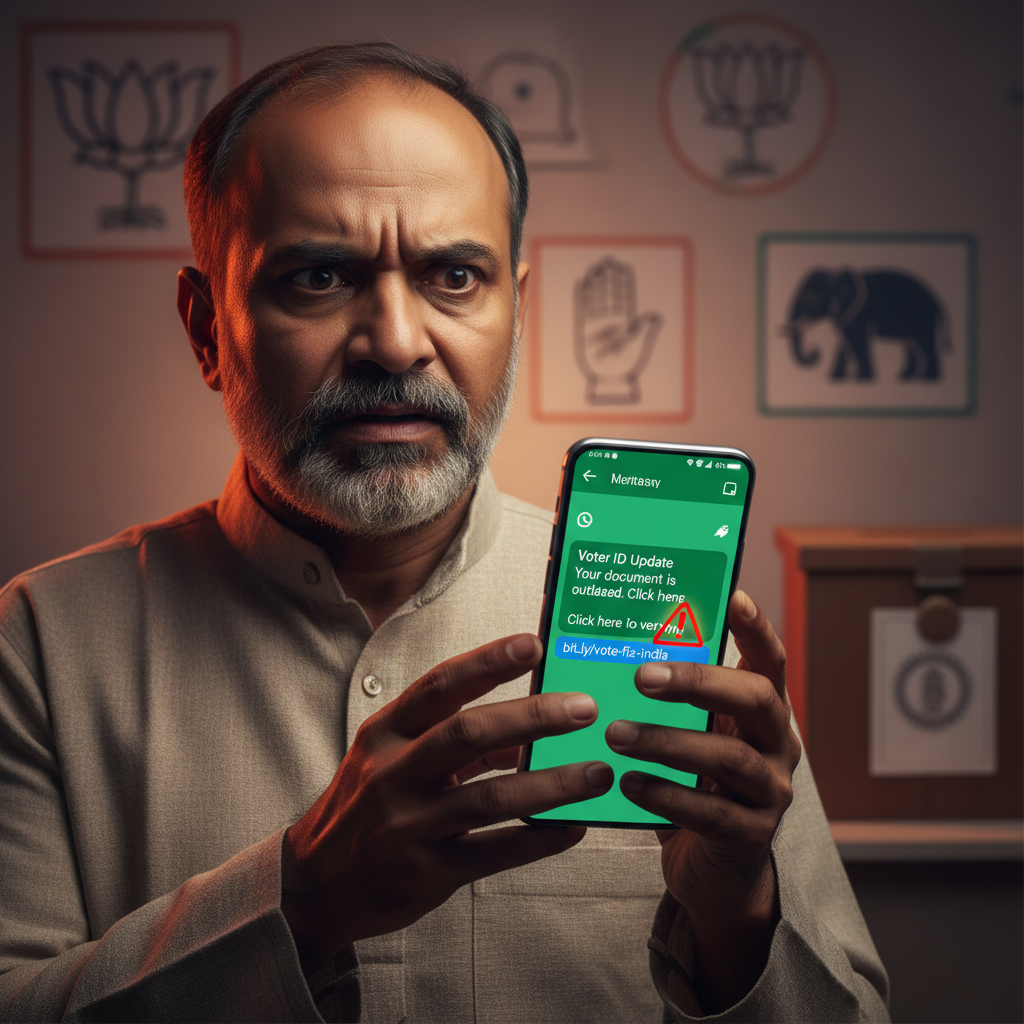
Election Commission SMS / WhatsApp Voter ID update link — is it real?
Beware of calls, SMS, or WhatsApp messages pretending to be from the Election Commission of India (ECI) asking you to 'update' your voter ID. These scams often trick you into clicking malicious links or downloading fake apps to steal your personal and financial information, leading to identity theft or financial fraud.
How This Scam Works
As India gears up for various elections, fraudsters become increasingly active, preying on citizens' civic duty and fear of losing their voting rights. In this sophisticated scam, you might receive a message via SMS, WhatsApp, or even a phone call. The communication will typically claim to be from an official-sounding entity, like the "Election Commission of India" or "Election Officer," and will often use urgent language. The core of the scam revolves around a fabricated need to "update," "verify," or "re-register" your Voter ID. The message will state that if you don't comply immediately, your voter registration will be cancelled, or you won't be able to vote in the upcoming elections. To facilitate this supposed update, they will provide a malicious link (often disguised to look legitimate, perhaps including "eci.gov.in" in a sub-domain or via URL shorteners) or instruct you to download an "official" mobile application (APK file) directly. If you click the link, you're directed to a phishing website designed to mimic the official ECI portal. Here, you'll be prompted to enter sensitive personal details such as your full name, date of birth, address, Aadhaar number, PAN details, and even bank account information or UPI IDs. Some advanced phishing sites might even ask for your Voter ID number itself, along with an OTP sent to your registered mobile number, which they then intercept. If you download the fake APK, it's typically a Trojan or spyware. This malicious app can then gain unauthorized access to your phone's data, including contacts, messages, gallery, and crucially, intercept SMS messages, allowing them to steal OTPs for financial transactions or further identity theft. In some cases, scammers on the phone might directly ask for banking details, credit/debit card numbers, CVV, or UPI PINs under the guise of "verification" or a small "processing fee." The ultimate goal is to compromise your identity, drain your bank accounts, or use your details for other fraudulent activities.
Red Flags
- Urgent and Threatening Language:** Messages or calls creating panic, threatening de-registration, or demanding immediate action to "update" your Voter ID.
- Requests for Personal or Financial Information:** Official government bodies, including the ECI, will *never* ask for your bank account details, UPI PIN, credit/debit card numbers, CVV, or OTP over the phone, SMS, or through unofficial links for voter ID updates.
- Suspicious Links/Attachments:** Links that don't clearly belong to the official Election Commission website (https://eci.gov.in) or requests to download APK files from unknown sources. Official apps are always downloaded from trusted app stores (Google Play Store, Apple App Store).
- Generic Greetings/Typos:** Messages that use generic greetings ("Dear Citizen") instead of your name, or contain grammatical errors and spelling mistakes.
- Unsolicited Contact:** Receiving a call or message out of the blue, especially if you haven't recently interacted with the ECI or requested any voter ID changes.
- Demands for Money:** Any request for a "processing fee" or "update charge" for voter ID services. Voter registration and updates are free of charge.
How to Stay Safe
- Verify Directly:** If you receive a suspicious message, do not click any links. Instead, independently visit the official Election Commission of India website (eci.gov.in) or call their official helpline numbers to verify any information.
- Never Share Sensitive Information:** Absolutely never share your Aadhaar number, PAN, bank account details, UPI PIN, credit/debit card information, CVV, or OTP with anyone claiming to be from the ECI or any other government body over phone, SMS, or unofficial links.
- Download from Official Stores Only:** Only download mobile applications from reputable app stores like the Google Play Store or Apple App Store. Never install APK files from unknown sources.
- Be Skeptical of Urgency:** Fraudsters thrive on creating panic. Always take a moment to pause, think, and verify before acting on urgent requests.
- Report Suspicious Communication:** Forward suspicious SMS messages to 1900 (for TRAI) or report spam calls/WhatsApp messages within the app.
- Educate Yourself and Others:** Share this information with family and friends, especially senior citizens, who might be more vulnerable to such scams.
If You Are Targeted
- Do NOT Engage:** If you receive such a call or message, do not reply or click any links. Disconnect the call immediately.
- Report to ECI:** Inform the Election Commission of India about the fraudulent communication through their official channels.
- Report to Cybercrime:** If you have clicked a malicious link, downloaded an APK, or shared any sensitive information, immediately report the incident to the National Cybercrime Helpline at 1930 or file a complaint on the cybercrime portal (cybercrime.gov.in).
- Secure Your Accounts:** If you suspect your financial details have been compromised, contact your bank and block your cards immediately. Change passwords for all linked accounts, especially banking and email. If you installed a malicious APK, factory reset your phone after backing up important data.
- Monitor Your Finances:** Regularly check your bank statements, UPI transaction history, and credit reports for any suspicious activity.
ScamGuard24 Insight
This scam leverages a high-trust institution (ECI) and a critical civic process (voting) to exploit fear and urgency. The evolving methods, from phishing links to malicious APKs, demonstrate the sophistication of these fraudsters, making public awareness and critical verification paramount for every citizen.
Suspect a scam right now?
Open ScamGuard24 ScannerRecommended protection tools
AffiliateWe may earn a small commission if you sign up — it never changes our editorial picks.
India's most trusted antivirus. Blocks malicious APKs, UPI phishing and fake banking apps.
Get Quick HealAll-in-one mobile security + VPN. Stops phishing links shared on WhatsApp and SMS.
Try Norton 360Stop reusing passwords. Auto-fills only on the real bank site, never on phishing pages.
Get NordPassRelated alerts
 HIGH RISK
Instagram/WhatsApp task scam, invest money daily return, is it real?
 HIGH RISK
Fake Aadhaar Update Centre near me — is it real? How to check?
 HIGH RISK
Comments
Be the first to comment.